 Epickit for Jira
Stop rebuilding the same epic every sprint.
Save an epic once. Answer two questions. Get every story and sub-task, in order.
$0.30 per user/month, free up to 10 users. Leading template app: $1.08Create from template
Save the epic you already ran.
Open it, choose ••• → Save as template. Its stories and sub-tasks come along, in their current order.
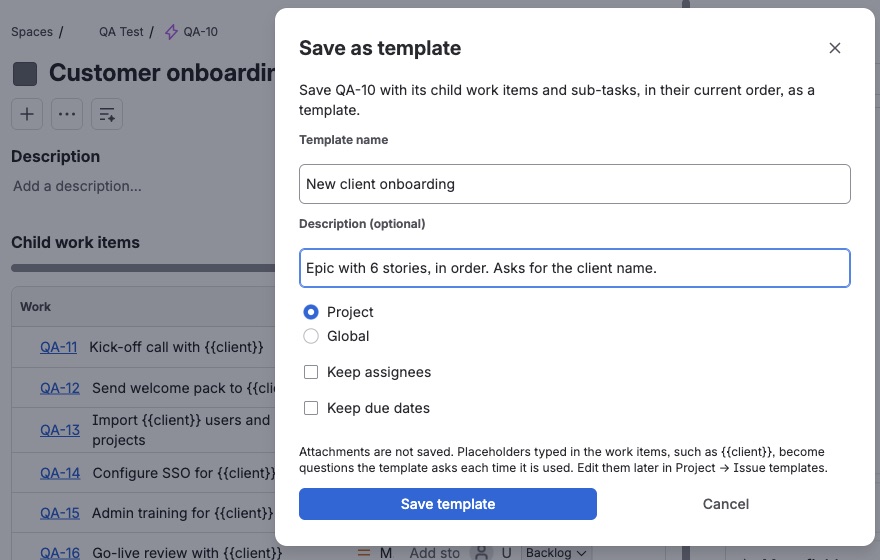
Placeholders become questions.
Type {{client}} once. Everyone who uses the template is asked for it.
{{date+14}}{{sprint}}{{reporter}}- Customer onboarding: {{client}}GlobexEpic
- Kick-off call with {{client}}Globex{{kickoff}}Dec 8
- Admin training{{kickoff+14}}Dec 22
- Go-live review, owner {{owner}}Priya{{kickoff+30}}Jan 7
Created in your order. Every time.
You see every item before it exists. Then they are created one by one and ranked as listed.
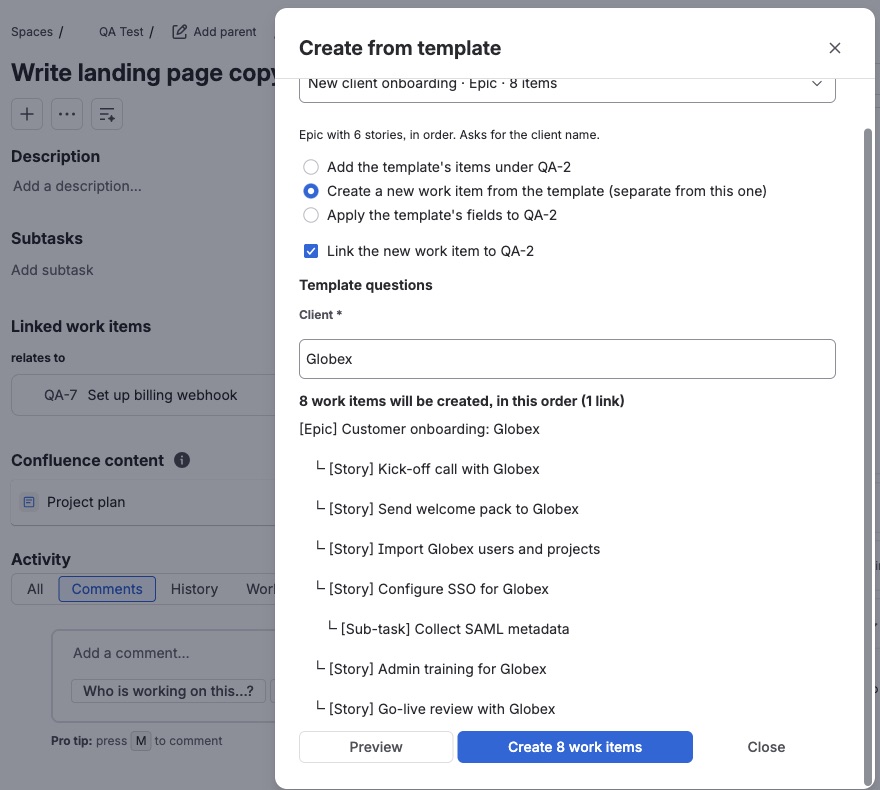
Three ways to use a template.
Under this issue
Add the template's stories and sub-tasks to an epic you already have.
As a new work item
Create the whole tree, linked back to where you started.
Apply its fields
Fill this issue's description, checklist, labels and fields.
Your templates stay in your Jira.
Built on Atlassian Forge. Templates live in your site's storage, and the app calls nothing outside Atlassian.
Same job. A fraction of the price.
Epickit
- Epic, stories and sub-tasks in one go
- Asks questions as you create
- Free up to 10 users
- New: no reviews yet
Issue Templates for Jira
- Epic, stories and sub-tasks in one go
- Asks questions as you create
- Free up to 10 users
- 3.0★ from 134 reviews
Deep Clone for Jira
- Clones whole epic trees
- Questions at create: not on its listing
- Free up to 10 users
- 4.5★ from 148 reviews
Templating.app
- Epic, stories and sub-tasks in one go
- Asks questions as you create
- Free up to 10 users
- 4.8★ from 89 reviews
Monthly price on the Atlassian Marketplace for 11–100 users (per-user price × users), checked 28 Nov 2026: Issue Templates for Jira, Deep Clone for Jira, Templating.app. Ratings from the same listings. Checks and dots describe each listing's own feature claims; we have not tested the other apps. Templating.app also does project and board templates; Deep Clone copies whole projects.
Pricing
Billed by Atlassian. Free for up to 10 users.
Every feature in every tier. Not on the Marketplace yet: ask for early access.
Questions
Can I install Epickit today?
Not yet. The app is built, and it is coming to the Atlassian Marketplace once our partner listing is approved. Email hello@odelabs.dev for early access and we will tell you the day it is listed.
What does it cost?
Free for up to 10 users. Then $0.30 per user per month up to 100 users, $0.18 up to 250, $0.09 up to 1,000 and $0.04 above that. Atlassian bills you through the Marketplace, like any other Jira app.
Can't Jira's own clone do this?
Partly. Jira Cloud can clone an epic with its child items, but a user test in Atlassian's announcement thread found it does not copy the sub-tasks of those children, and every summary keeps the old names. Epickit recreates the whole tree and asks for the new names and dates first.
What can a template hold?
Up to 300 work items, 4 levels deep: summary, description, labels, components, priority, assignee rule, due date, custom fields, a checklist, links between the items and 'add to the active sprint'. Attachments are not saved.
How do the questions work?
Type a placeholder such as {{client}} into any summary, description, label or due date. When someone uses the template, each placeholder becomes a question: text, number, date, choice or person. Built-ins like {{date+14}}, {{sprint}} and {{reporter}} fill themselves.
Who can make and use templates?
Project admins manage their project's templates, Jira admins manage global ones. Anyone who can create work items in a project can use them. Every read and create respects the user's Jira permissions.
What happens if creation stops halfway?
It runs in the background, so closing the dialog is safe. Items are created one at a time in template order, and a retry never creates a duplicate: each item carries a small marker the app checks first.
Where are our templates stored?
In Atlassian's Forge storage for your site, in your data residency region. The app makes no calls outside Atlassian, and we (the vendor) cannot see your templates or work items.
Does it work with Jira Data Center or Server?
No. It is a Forge app for Jira Cloud only.
Can I move templates between projects or sites?
Yes. Export templates as JSON and import them on another project or site, with a choice to rename, skip or replace templates that share a name.
Coming to the Atlassian Marketplace.
Want it on your Jira first? Tell us what you rebuild every sprint and we'll set you up.
Get early access